



كانت لدي حوالي عشرين سؤالاً قبل الطلب، وأجاب الفريق عن كل سؤال بصبر، حتى الأسئلة البسيطة. شعرت بالاهتمام منذ الرسالة الأولى.
كيفية استخدام Lucine
جولة سريعة على أدوات تحكّم Lucine للبدء.
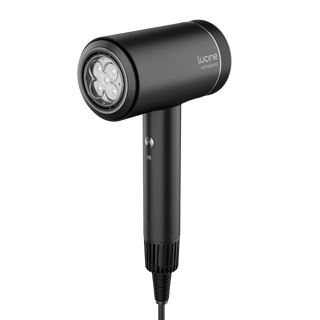
تحكّم بسيط. ثلاث طرق لاستخدام Lucine.
- الطاقة: حرّكي المفتاح إلى I لتدفق هواء منخفض أو II لتدفق هواء عالِ.
- الحرارة: اضغطي زر الحرارة لاختيار البارد أو الدافئ أو الساخن.
- INFRASONIC: اضغطي مطوّلاً على زر الحرارة لبدء الدورة التلقائية للهواء والحرارة.
- الضوء: اضغطي IR لتشغيل الضوء الأحمر بطول 660 نانومتر والقريب من الأشعة تحت الحمراء بطول 850 نانومتر معاً.
للحصول على نقاط بداية خاصة بنوع شعرك، راجعي إعدادات Lucine الخاصة بك. وللشرح الكامل للتقنية، راجعي كيف يعمل Lucine.
تنظيف الفلتر: خمس خطوات، شهرياً.
- أطفئي Lucine وافصليه عن الكهرباء، ثم اتركيه يبرد تماماً قبل التنظيف.
- افصلي الغطاء الخلفي وأزيلي الفلتر.
- أزيلي الوبر والشعر بالفرشاة، ثم اشطفي الفلتر تحت الماء الجاري إذا احتاج إلى تنظيف أعمق.
- اتركي الفلتر يجف تماماً بالهواء قبل إعادة تركيبه — لا تعيدي تركيبه أبداً وهو رطب.
- أعيدي تثبيت الفلتر والغطاء الخلفي في مكانهما وتأكدي من أن تدفق الهواء يبدو طبيعياً في استخدامك التالي.
نظّفي الفلتر مرة واحدة على الأقل شهرياً، وبمعدل أعلى مع الاستخدام المكثف أو اليومي. كما أن انسداد الفلتر هو السبب الأكثر شيوعاً لضعف تدفق الهواء، راجعي قسم استكشاف الأخطاء أدناه.
استكشاف الأخطاء
لا طاقة
تأكدي من إدخال القابس بالكامل وجرّبي مأخذاً كهربائياً آخر. تحققي من أن مفتاح الطاقة مضبوط على I أو II.
تدفق هواء ضعيف
تحققي من أن الفلتر والغطاء الخلفي نظيفان ومركّبان بشكل صحيح، ومن عدم وجود ما يسد مدخل الهواء. راجعي تنظيف الفلتر أعلاه.
إيقاف تشغيل غير متوقع
يحتوي Lucine على قاطع أمان حراري قد يتفعّل إذا كان تدفق الهواء مقيّداً. اتركيه يبرد لبضع دقائق، ونظّفي الفلتر إذا لزم الأمر، ثم أعيدي التشغيل.
ضوء IR لا يعمل
يعمل الضوء الأحمر والقريب من الأشعة تحت الحمراء فقط في وضع الهواء البارد أو المعتدل. حوّلي إلى البارد واضغطي IR مجدداً — يُطفأ الضوء تلقائياً في وضع الدافئ أو الساخن.
حرارة غير معتادة
توقفي عن الاستخدام فوراً، وافصلي Lucine عن الكهرباء واتركيه يبرد. إذا استمرت الحرارة غير المعتادة في استخدامك التالي، توقفي عن استخدام الجهاز وتواصلي مع خدمة عملاء Aurrelle.
إذا لم تكن مشكلتك مذكورة هنا أو استمرت بعد تجربة هذه الخطوات، تواصلي مع Aurrelle أو راجعي تغطية الضمان.